
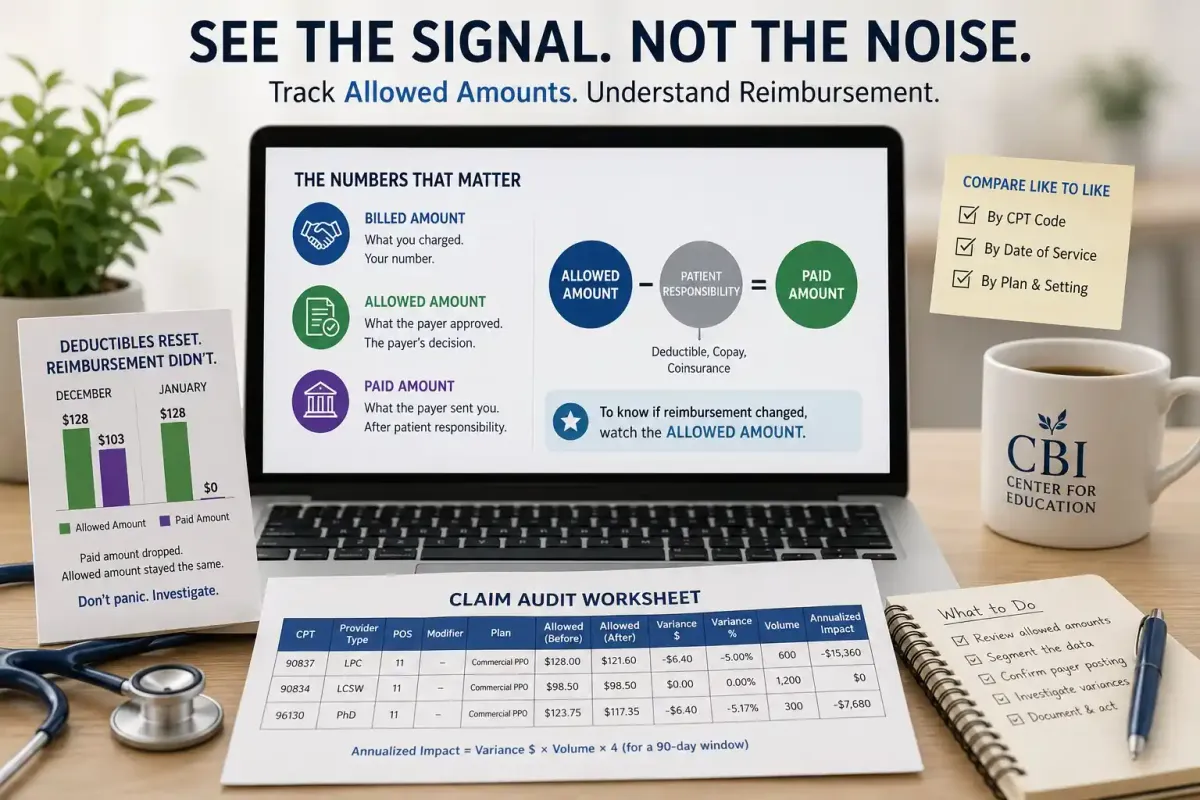
A behavioral health practice pulls its January numbers and sees psychotherapy reimbursement down sharply from December. Panic. Emails to the payer. A week of investigation.
The rate never changed. Deductibles reset on January 1.
This is the single most common false alarm in behavioral health revenue review, and it has a single cause: looking at the paid amount instead of the allowed amount.
In our first article we established that claims data is where reimbursement changes surface. In the second, we separated annual adjustments from quarterly postings. This article addresses the mechanic underneath both: which number on the remittance actually tells you what the payer decided.
The Two Numbers, Plainly
Every processed claim carries several dollar figures. Two matter most.
Billed amount is what you charged. It is your number, not the payer’s, and it tells you almost nothing about reimbursement.
Allowed amount is what the payer approved for that service under your contract. This is the payer’s decision. It reflects your negotiated rate, the fee schedule, and any applicable pricing methodology.
Paid amount is what the payer actually sent you — the allowed amount minus whatever the patient owes.
The relationship:
Allowed Amount − Patient Responsibility = Paid Amount
Patient responsibility is deductible, copay, and coinsurance. The allowed amount is the payer’s reimbursement decision. The paid amount is that decision after it has been split between payer and patient.
When you want to know whether reimbursement changed, you want the payer’s decision. That is the allowed amount.
How Patient Responsibility Distorts a Paid-Amount Review
Three worked examples. In all three, the allowed amount never moves.
Example 1 — The January cliff
A patient’s plan resets January 1 with a $2,000 deductible.
| December | January | |
|---|---|---|
| Allowed amount | $128.00 | $128.00 |
| Patient responsibility | $25 copay | $128 (deductible) |
| Paid amount | $103.00 | $0.00 |
Paid amount collapsed to zero. Reimbursement did not change at all. Every January, this pattern repeats across your entire panel, and a paid-amount review reads it as a catastrophic rate cut.
Example 2 — The coinsurance plan
Two patients, same CPT code, same provider, same week.
| Patient A (copay plan) | Patient B (20% coinsurance) | |
|---|---|---|
| Allowed amount | $128.00 | $128.00 |
| Patient responsibility | $30.00 | $25.60 |
| Paid amount | $98.00 | $102.40 |
Identical reimbursement, different paid amounts. If your payer mix shifts toward high-deductible plans over a year, average paid amount falls while your contracted rate is untouched.
Example 3 — The change you would actually miss
| Before | After | |
|---|---|---|
| Allowed amount | $128.00 | $121.60 |
| Patient responsibility | $30 copay | $30 copay |
| Paid amount | $98.00 | $91.60 |
Here the allowed amount dropped 5% — a genuine fee schedule change. The paid amount also dropped, but by an amount easily dismissed as normal variation, especially inside a month of mixed plan types.
The pattern across all three: paid amount moves for reasons that have nothing to do with reimbursement, and it moves quietly when reimbursement actually changes. It is noisy in both directions. The allowed amount is stable unless the payer changes something.
How to Compare Allowed Amounts by CPT Code and Date of Service
Three rules make the comparison valid.
Rule 1: Compare like to like. Segment by CPT code, provider type and credential, place of service, telehealth modifier, and plan or network. A single “average allowed amount” across everything is nearly useless — a shift in service mix moves it without any rate change.
Rule 2: Use date of service, not paid date. Fee schedules apply based on when the service occurred. Claims paid in July may include services rendered in May under the prior schedule. Sorting by paid date scrambles the before-and-after comparison. Sort by date of service. Always.
Rule 3: Use the modal value, not the average. For a given CPT code, provider type, and plan, the allowed amount should be a repeating figure. Pull the value that appears most often, not the mean. If several distinct allowed amounts appear for what should be one combination, that is itself a finding — usually an unnoticed plan variation or a claim processed under the wrong schedule.
The Simple Claim Audit Table
This is the whole review. One table, filled in per CPT code.
| CPT | Provider Type | POS | Modifier | Plan | Allowed (Before) | Allowed (After) | Variance $ | Variance % | Volume | Annualized Impact |
|---|---|---|---|---|---|---|---|---|---|---|
| 90837 | LPC | 11 | — | Commercial PPO | ||||||
| 90837 | LPC | 02 | 95 | Commercial PPO | ||||||
| 90834 | LCSW | 11 | — | Commercial PPO | ||||||
| 99214 | MD | 11 | — | Commercial PPO | ||||||
| 96130 | PhD | 11 | — | Commercial PPO |
How to fill it:
- Choose a comparison window — 90 days before and 90 days after the effective date, by date of service.
- For each row, pull the modal allowed amount in each window.
- Variance $ = After − Before. Variance % = Variance $ ÷ Before.
- Volume = units of that combination in the after-window.
- Annualized impact = Variance $ × Volume × 4 (for a 90-day window).
That last column converts an abstract percentage into a dollar figure leadership can act on. A $6.40 decrease looks trivial until 2,400 annual units make it a $15,360 revenue change.
Rows worth adding: your top codes by volume, your top codes by revenue (not the same list), every testing code you bill, and any code where telehealth and in-office both occur — those belong on separate rows, because they can price differently.
What a Variance Means — and What to Do
No variance. The rate held. Document it and move on. A confirmed negative is a real result.
Small variance on some codes only. Usually a targeted schedule revision. Confirm the effective date matches the payer’s posting and check whether the affected codes share a category.
Variance in one segment only — telehealth but not in-office, one provider type but not another. This points to a policy change rather than a broad rate change, and it is easy to miss without segmentation.
Multiple allowed amounts for one combination. Investigate before concluding anything. Common causes: an unrecognized plan variation, claims processed under the wrong schedule, or a credentialing issue affecting how a provider is priced.
Variance you cannot explain. Request written payer clarification. Cite the specific CPT code, dates of service, claim numbers, and the allowed amounts you observed. Written confirmation is what supports an appeal.
Bottom Line
The paid amount answers “what landed in the bank.” That is a cash-flow question, and it matters.
The allowed amount answers “what did the payer decide our work is worth.” That is the reimbursement question, and it is the one that tells you whether a fee schedule change touched your practice.
Confusing the two produces January panic over deductible resets, and quiet acceptance of real rate cuts hidden inside normal-looking variation.
Watch the allowed amount. Compare by CPT code and date of service. Segment before concluding anything.
Allowed_Amount_Review_Worksheet
Related reading: Your Payer Rate May Have Changed. Would Your Claims Data Catch It? · Annual Adjustment vs. Quarterly Fee Schedule Updates
CBI Center for Education supports the long-term development of mental health professionals through education, consultation, and research. This series offers practical guidance on behavioral health reimbursement awareness, documentation, testing workflow review, and operational decision-making. Explore CBI Center for Education courses and resources designed to help clinicians and behavioral health organizations keep improving the care they provide.
Compliance Note
This series is for educational purposes only and is not legal, coding, billing, payer-contract, or compliance advice. CPT coding, coverage, authorization, documentation, provider eligibility, and reimbursement vary by payer, contract, region, plan, provider type, place of service, and date of service. Behavioral health organizations should confirm payer policy, contract terms, current CPT guidance, state scope-of-practice requirements, and internal compliance standards before changing any billing workflow.